Quickstart - Objective-C
Compatibility
The Pulse library works with iOS 8.0 onwards with devices equipped with Bluetooth 4.0 or higher.
Installation
Add Pulse SDK
You can install the Pulse SDK either using Pod or manually linking the framework into your project.
Pod Install
Put the following text in your Pod.file.
platform :ios, '8.0'
target 'Your-target-name' do
    pod 'PulseSDK', :git => 'https://bitbucket.org/pulseid/pulse-ios-release.git', :tag => "3.3"
end
Manual Install
Install the SDK by adding the PulseSDK.framework file to the project under Embedded Binaries. The PulseSDK.framework file is located in the Pods repository.

Add permissions
Location permissions
For handling permission of location services, add the following keys and explanation in your Info.plist
<key>NSLocationAlwaysAndWhenInUseUsageDescription</key>
<string>Your explanation for using  user's location goes here</string>
<key>NSLocationAlwaysUsageDescription</key>
<string>Your explanation for using  user's location goes here</string>
<key>NSLocationWhenInUseUsageDescription</key>
<string>Your explanation for using  user's location goes here</string>
User Opt-in
Its is important that you clearly and effectively communicate the reason for using the User's location using above settings.
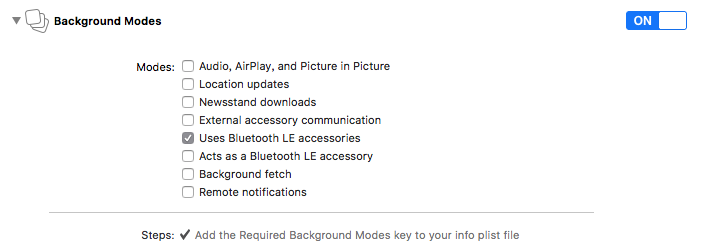
Background Execution
Enable Bluetooth LE options under Project Capabilities:
Import SDK
Import PulseSDK module in the AppDelegate.h file.
@import PulseSDK;
If you are using UserNotifications in iOS 10, also import the following code in AppDelegate.h file:
@import UserNotifications;
@interface AppDelegate : UIResponder <UIApplicationDelegate,UNUserNotificationCenterDelegate>
@property (strong, nonatomic) UNUserNotificationCenter *center;
Integration Example
Please use the Demo Application as a reference implementation for the SDK.
Configuration
App-key and end-point
To initialize the SDK use the setConfig method with your app key within the didFinishLaunchingWithOptions method in the AppDelegate.m file:
//key will be provided by Pulse
NSDictionary* config=@{@"url":@"your-endpoint-url",@"key":@"your-app-key-here"};
[[PulseSDK sharedClient] setConfig:config];
Seek permissions
The user will be prompted by iOS to provide permission to app for sharing their location. This prompt will appear when the SDK starts for the first time.
If you do want to permission prompt as soon as the SDK starts, consider customising the workflow:
- Add new entry
@"permission":@"custom"in config.
NSDictionary* config=@{@"url":@"your-endpoint-url",@"key":@"your-app-key-here", @"permission":@"custom"};
- Call the permission request when you need
[[PulseSDK sharedClient] requestForLocationPermission];
[[PulseSDK sharedClient] requestForNotificationPermission];
Integration
Set Session
By default, the SDK will generate a 32 char hexadecimal session id, based on app's APP IDENTIFIER. All analytics and data will be gathered against this session id
Use the setSessionID method before starting the service, if you want to use a custom identifier. This method must be called after setConfig method and before initialising the service.
[[PulseSDK sharedClient] setSessionId:@"your-session-id"];
Start Services
Pulse interactions can be triggered even when the app is in the background or inactive (not in memory). Based on project requirements, Pulse's service can be started in different modes to selectively trigger interactions:
To interact in all modes (foreground, background, and terminated) modes
- In this mode, in
didFinishLaunchingWithOptions, the methodstartMonitoringStartSdkhas twoYESparameters.
- (BOOL)application:(UIApplication *)application didFinishLaunchingWithOptions:(NSDictionary *)launchOptions
{
    //key and url will be provided by Pulse
    NSDictionary* config = @{@"url":@"your-endpoint-url",@"key":@"your-app-key-here"};
    [[PulseSDK sharedClient] setConfig:config];

    if([[[UIDevice currentDevice] systemVersion] floatValue]<10){
            if ([launchOptions valueForKey:UIApplicationLaunchOptionsLocalNotificationKey]) {
                UILocalNotification* notification=[launchOptions valueForKey:UIApplicationLaunchOptionsLocalNotificationKey];
                [[PulseSDK sharedClient]appLaunchedOnNotificationClick:notification startInForeground:YES background:YES];
            }
            else
                [[PulseSDK sharedClient] startMonitoring];
    }
    //for ios 10 or greater
    else{
            self.center=[UNUserNotificationCenter currentNotificationCenter];
            self.center.delegate = self;
            [[PulseSDK sharedClient] startMonitoring];
    }

    return YES;
}
To interact in foreground and background modes:
- In this mode, in
didFinishLaunchingWithOptions, the methodstartMonitoringStartSdkhas foreground parameterYESand background parameterNO. - In
applicationDidEnterBackground, the methodstartSdkhas twoYESparameters.
- (BOOL)application:(UIApplication *)application didFinishLaunchingWithOptions:(NSDictionary *)launchOptions
{
    //key and url will be provided by Pulse
    NSDictionary* config=@{@"url":@"your-endpoint-url",@"key":@"your-app-key-here"};
    [[PulseSDK sharedClient] setConfig:config];

    if([[[UIDevice currentDevice] systemVersion] floatValue]<10){
            if ([launchOptions valueForKey:UIApplicationLaunchOptionsLocalNotificationKey]) {
                UILocalNotification* notification=[launchOptions valueForKey:UIApplicationLaunchOptionsLocalNotificationKey];
                [[PulseSDK sharedClient]appLaunchedOnNotificationClick:notification startInForeground:YES background:NO];
            }
            else{
                [[PulseSDK sharedClient] setForegroundMode:YES backgroundMode:NO];
                [[PulseSDK sharedClient] startMonitoring];
            }
    }
    //for ios 10 or greater
    else{
            self.center=[UNUserNotificationCenter currentNotificationCenter];
            self.center.delegate = self;
            [[PulseSDK sharedClient] setForegroundMode:YES backgroundMode:NO];
            [[PulseSDK sharedClient] startMonitoring];
    }

    return YES;
}
- (void)applicationDidEnterBackground:(UIApplication *)application{
    [[PulseSDK sharedClient] setForegroundMode:YES backgroundMode:YES];
}
** To interact in foreground and terminated modes:**
-
In this mode, in
didFinishLaunchingWithOptions, the methodstartMonitoringStartSdkhas twoYESparameters. -
In
applicationDidEnterBackground, the methodstartSdkhas foreground parameterYESbackground parameterNO.
- (BOOL)application:(UIApplication *)application didFinishLaunchingWithOptions:(NSDictionary *)launchOptions
{
    //key and url will be provided by Pulse
    NSDictionary* config=@{@"url":@"your-endpoint-url",@"key":@"your-app-key-here"};
    [[PulseSDK sharedClient] setConfig:config];

    if([[[UIDevice currentDevice] systemVersion] floatValue]<10){
            if ([launchOptions valueForKey:UIApplicationLaunchOptionsLocalNotificationKey]) {
                UILocalNotification* notification=[launchOptions valueForKey:UIApplicationLaunchOptionsLocalNotificationKey];
                [[PulseSDK sharedClient]appLaunchedOnNotificationClick:notification startInForeground:YES background:YES];
            }
            else
                [[PulseSDK sharedClient] startMonitoring];
    }
    //for ios 10 or greater
    else{
            self.center=[UNUserNotificationCenter currentNotificationCenter];
            self.center.delegate = self;
            [[PulseSDK sharedClient] startMonitoring];
    }

    return YES;
}
- (void)applicationDidEnterBackground:(UIApplication *)application{
    [[PulseSDK sharedClient] setForegroundMode:YES backgroundMode:NO];
}
** To run in foreground mode only:**
- In this mode, in
didFinishLaunchingWithOptions, the methodstartMonitoringStartSdkhas foreground parameterYESbackground parameterNO.
- (BOOL)application:(UIApplication *)application didFinishLaunchingWithOptions:(NSDictionary *)launchOptions
{
    //key and url will be provided by Pulse
    NSDictionary* config=@{@"url":@"your-endpoint-url",@"key":@"your-app-key-here"};
    [[PulseSDK sharedClient] setConfig:config];

    if([[[UIDevice currentDevice] systemVersion] floatValue]<10){
            if ([launchOptions valueForKey:UIApplicationLaunchOptionsLocalNotificationKey]) {
                UILocalNotification* notification=[launchOptions valueForKey:UIApplicationLaunchOptionsLocalNotificationKey];
                [[PulseSDK sharedClient] appLaunchedOnNotificationClick:notification startInForeground:YES background:NO];
            }
            else{
                [[PulseSDK sharedClient] setForegroundMode:YES backgroundMode:NO];
                [[PulseSDK sharedClient] startMonitoring];
            }
    }
    //for ios 10 or greater
    else{
            self.center=[UNUserNotificationCenter currentNotificationCenter];
            self.center.delegate = self;
            [[PulseSDK sharedClient] setForegroundMode:YES backgroundMode:NO];
            [[PulseSDK sharedClient] startMonitoring];
    }

    return YES;
}
** To run in background and terminated mode:**
- In this mode, in
didFinishLaunchingWithOptions, the methodstartMonitoringStartSdkhas foreground parameterNObackground parameterYES.
- (BOOL)application:(UIApplication *)application didFinishLaunchingWithOptions:(NSDictionary *)launchOptions
{
    //key and url will be provided by Pulse
    NSDictionary* config=@{@"url":@"your-endpoint-url",@"key":@"your-app-key-here"};
    [[PulseSDK sharedClient] setConfig:config];

    if([[[UIDevice currentDevice] systemVersion] floatValue]<10){
            if ([launchOptions valueForKey:UIApplicationLaunchOptionsLocalNotificationKey]) {
                UILocalNotification* notification=[launchOptions valueForKey:UIApplicationLaunchOptionsLocalNotificationKey];
                [[PulseSDK sharedClient]appLaunchedOnNotificationClick:notification startInForeground:NO background:YES];
            }
            else{
                [[PulseSDK sharedClient] setForegroundMode:NO backgroundMode:YES];
                [[PulseSDK sharedClient] startMonitoring];
            }
    }
    //for ios 10 or greater
    else{
            self.center=[UNUserNotificationCenter currentNotificationCenter];
            self.center.delegate = self;
            [[PulseSDK sharedClient] setForegroundMode:NO backgroundMode:YES];
            [[PulseSDK sharedClient] startMonitoring];
    }

    return YES;
}
Receive notifications
In order to show notifications from Pulse Platform, you will need to implement delegate methods.
From iOS 10 and above, we support the delegate of UNNotificationCenter.
UserNotification
-(void)userNotificationCenter:(UNUserNotificationCenter *)center didReceiveNotificationResponse:(UNNotificationResponse *)response withCompletionHandler:(void(^)(void))completionHandler {
    //app was in background and user clicked on local alert notification to bring app in foreground
    [[PulseSDK sharedClient] loadViewOnUNNotificationClick:response.notification startInForeground:YES background:YES];
}

-(void)userNotificationCenter:(UNUserNotificationCenter *)center willPresentNotification:(UNNotification *)notification withCompletionHandler:(void (^)(UNNotificationPresentationOptions options))completionHandler{
    //app was in foreground
    [[PulseSDK sharedClient] loadViewOnUNNotificationClick:notification startInForeground:YES background:YES];
}
For devices below iOS 10, we support delegate of UINotification.
UINotification
-(void)application:(UIApplication *)application didReceiveLocalNotification:(UILocalNotification *)notification{
    //app was in background and user clicked on local alert notification to bring app in foreground
    [[PulseSDK sharedClient] loadViewOnNotificationClick:notification startInForeground:YES background:YES];
}
Stop Services
Pulse interactions can be force stopped if required. This feature can be used to implement custom user controls within the app to allow users to opt-in/out of using Pulse-powered features.
- To stop the PulseSDK Service:
[[PulseSDK sharedClient] disable];
- After stopping, to restart the PulseSDK Service:
[[PulseSDK sharedClient] enable];